Early access · Built in public

Clean data.Zero friction.

The Dynamics 365 import tool that catches errors before they touch your CRM, resolves duplicates side-by-side with your live data, and never modifies what already exists: only what you approve gets written.

Built for Dynamics 365 CE consultants, partners, admins and RevOps teams

app.importtod365.com / fix-center
Fix Center
7 records to review
29%
EN RACHA
#
NOMBRE
COMPANY
PAYMENT TERMS
2
Carlos
Fabrikam, Inc.
Net 30
3
Maria
Elegir…
4
Martin
EduCenter
× Net 90
5
Pablo
AgroSur
× 0.25
6
Sofia
Elegir…
× Hello world
29%
The problem

Importing to Dynamics 365 shouldn't be a leap of faith.

Native D365 import leaves you blind. You upload a file, cross your fingers, and only find problems once they're already inside your CRM.

Dynamics 365Imports
Import results
1 record imported successfully
3 import errors
↓ Download error log

Errors that show up late

Native import recommends staying under 20,000 rows per file, and you find errors row by row, with the system never telling you where it got stuck.

Dynamics 365Contacts
⚠ Possible duplicates detected
Carlos Ruiz
Existing record · Fab. Inc.
Carlos Ruiz
New record · Fabrikam Inc.
Import anyway
Cancel

Blind duplicates

Dynamics allows only 5 duplicate rules per table, and native merge works 2 records at a time. You end up with the same contact created 3 times.

Dynamics 365Contacts
Post-import cleanup
500 records with errors · manual review
🗑 Delete selected

Cleaning up after is expensive

Once bad data gets in, there's no magic undo: deleting and fixing by hand can take days. The only real defense is stopping errors before they ever reach the CRM.

The solution

See the problem before you import. Not after.

ImportToD365 replaces the "upload, pray, cleanup" loop with a 4-step wizard: upload, map, diagnose, import.

1

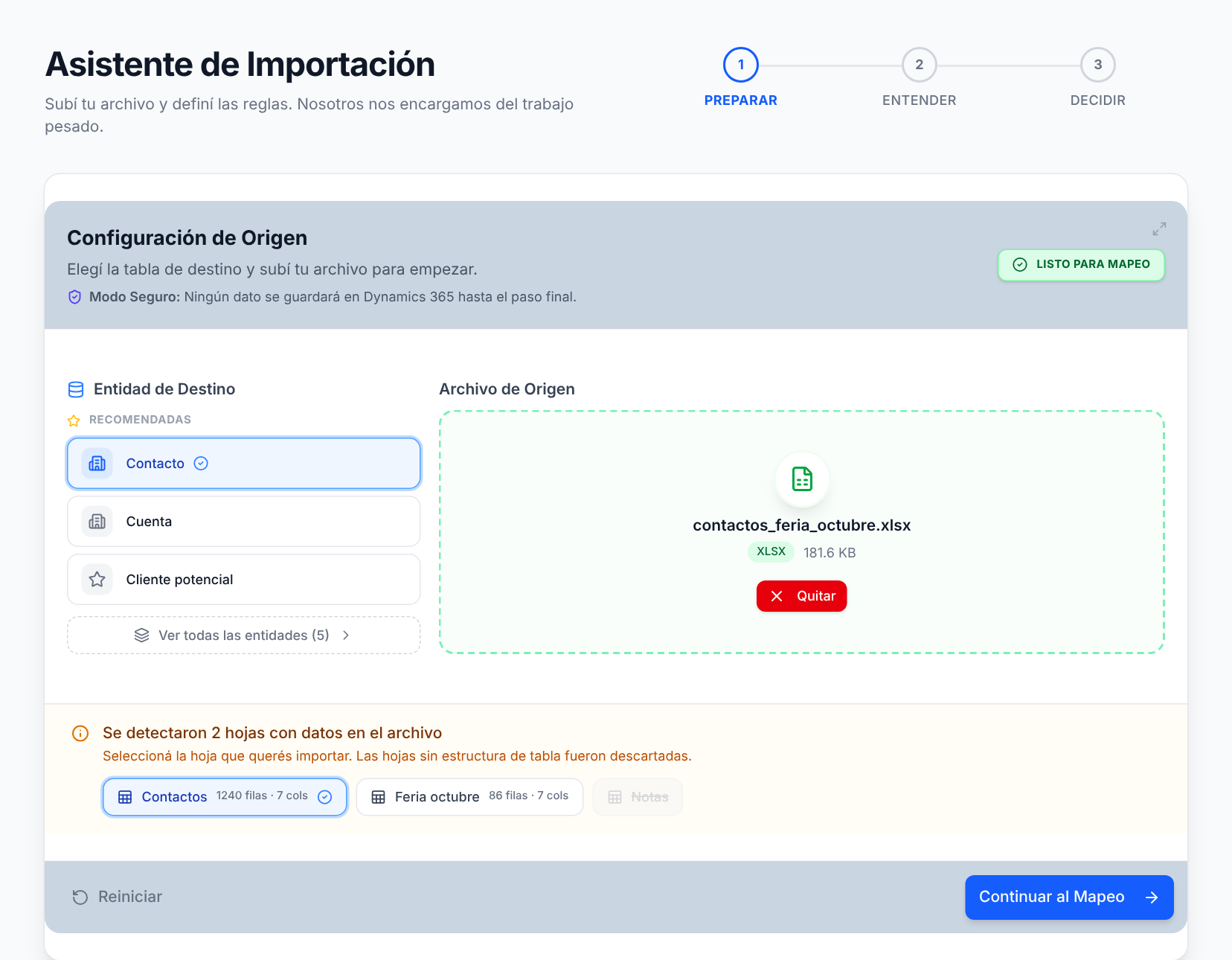
Upload — Pick your file and destination.

Upload your Excel or CSV (up to 50 MB, multi-sheet supported) and choose the Dynamics entity: Lead, Contact, Account, Opportunity or Product. Without touching the CRM yet.

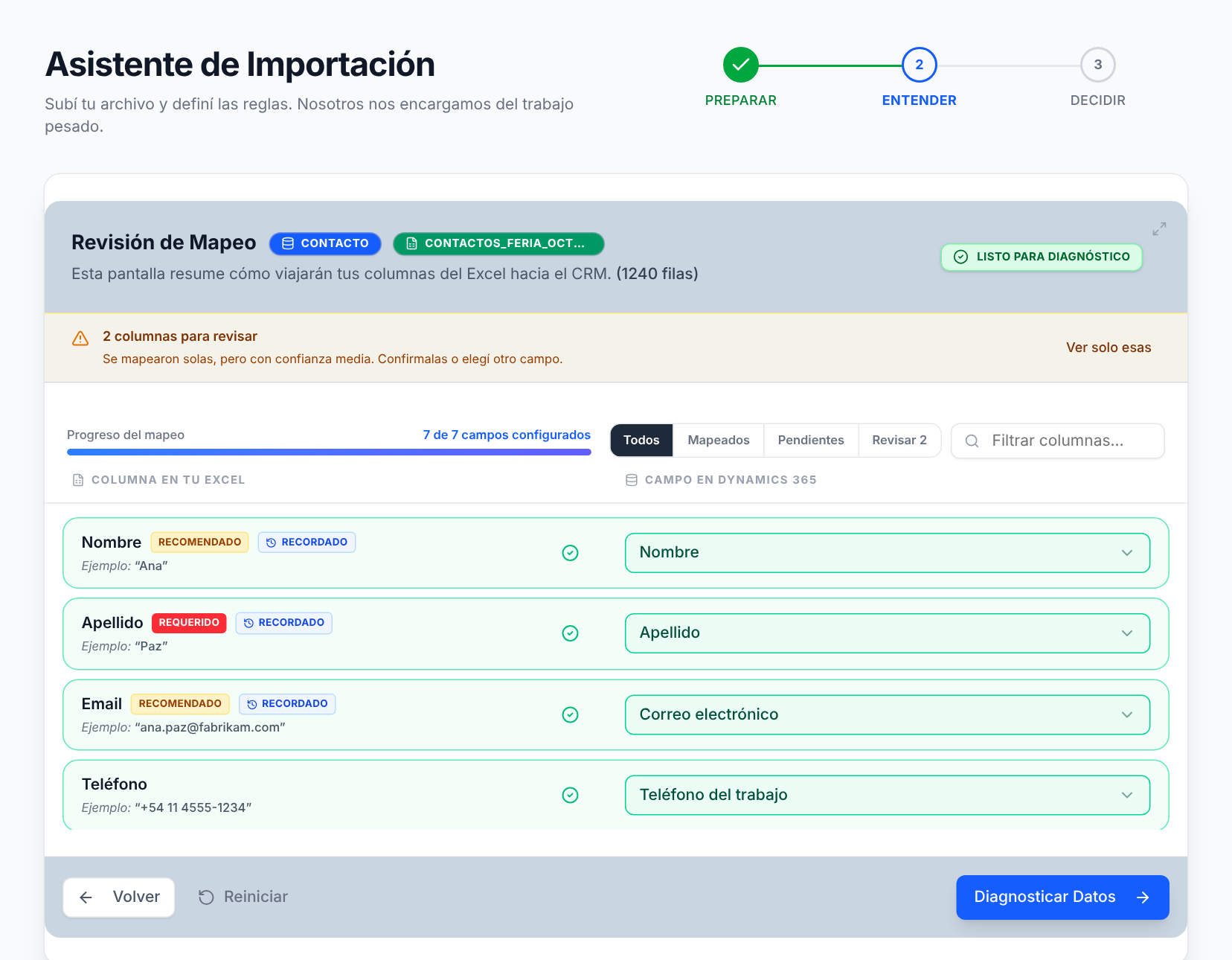
2

Map — Every column to its field.

The system suggests a mapping for each column to the right Dataverse field and flags what remains unmapped. You review, adjust and confirm.

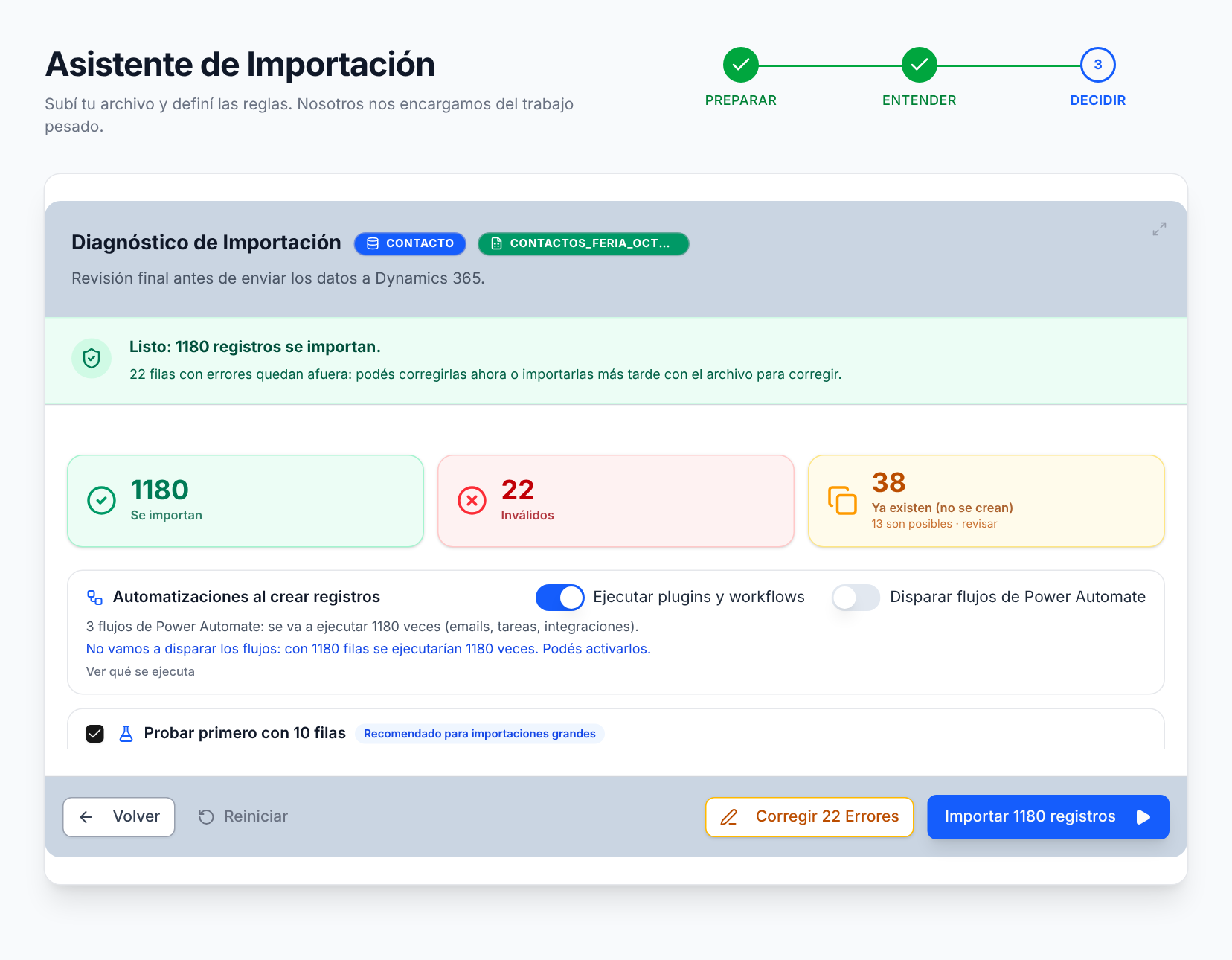
3

Diagnose — The whole pre-flight on one screen.

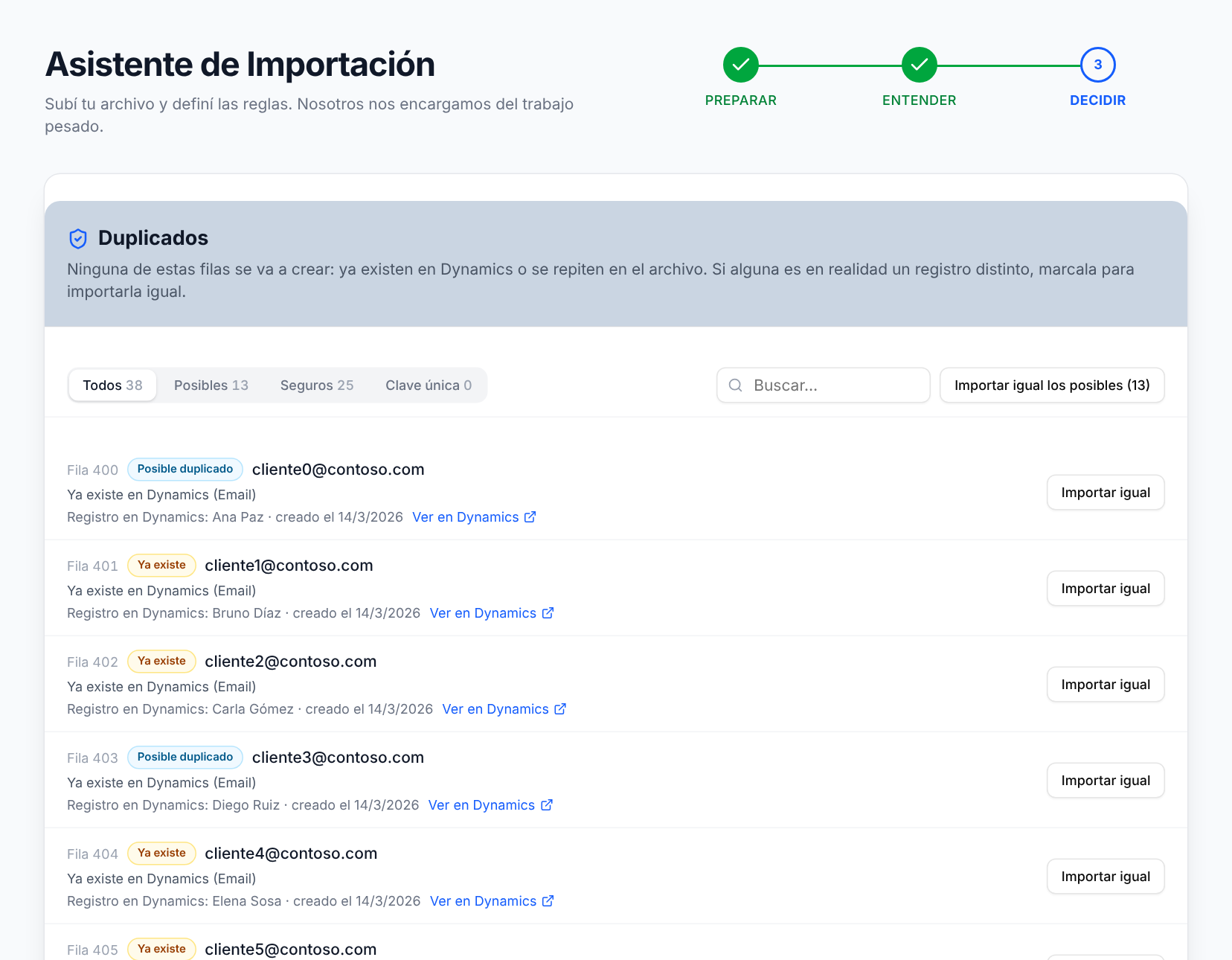
Invalid records with the exact reason, duplicates compared field by field against your live CRM, lookups and option sets verified. Fix inline and approve duplicates case by case or in bulk.

4

Import — Only what you approved.

Only the records you approved get written — what already exists in your CRM is never modified. When it's done, download the row-by-row report of what went in and what didn't.

Demo

2 minutes to see the full flow.

From file upload to confirmed import. No cuts, no tricks.

Features

Everything you need. Nothing you don't.

Every feature solves a real problem that D365 consultants face every week.

Pre-flight validation

Full validation before touching the CRM.

Upload your Excel or CSV, and in seconds see how many records are valid, how many Dynamics will reject, and why. Nothing writes until you decide.

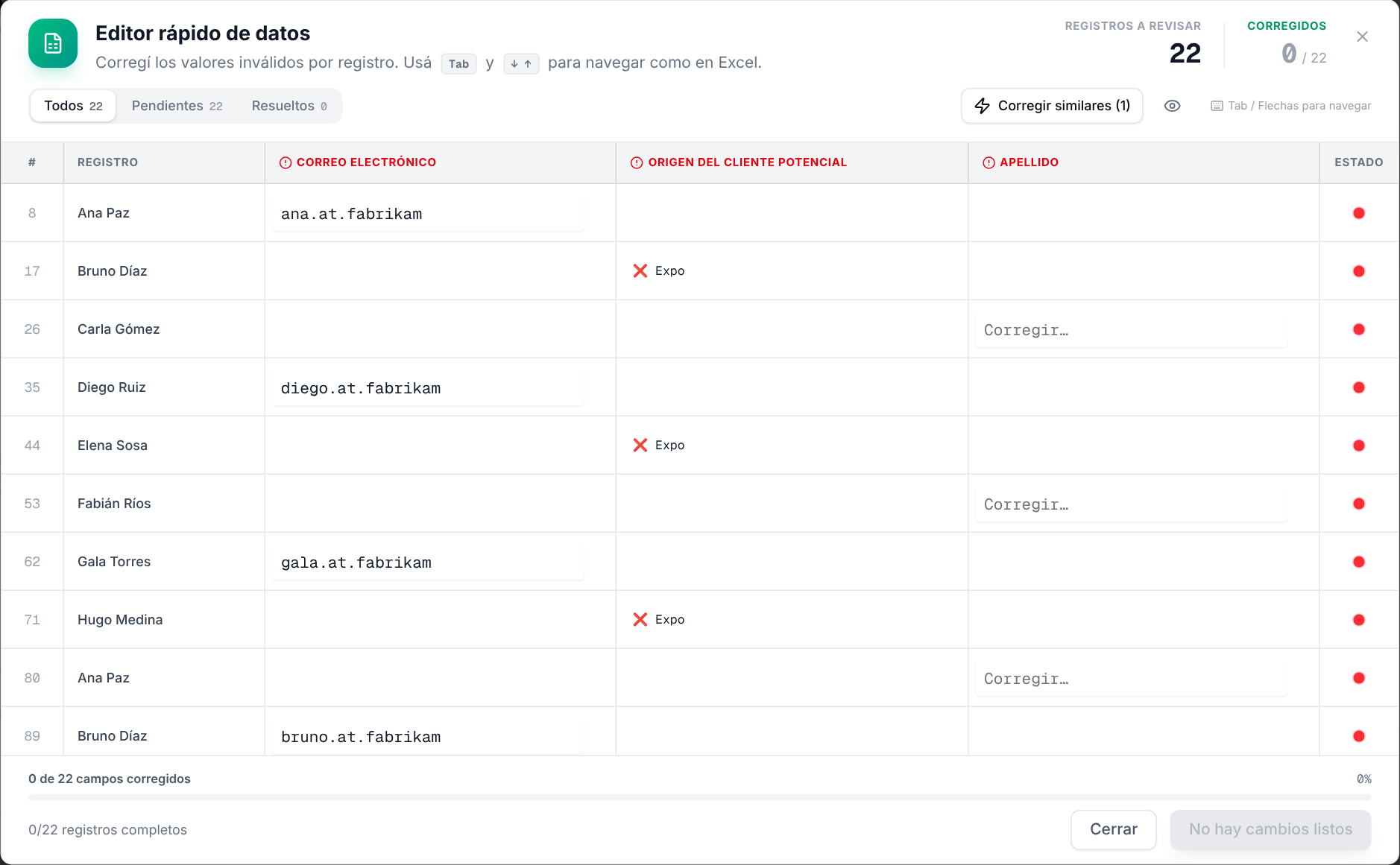
Fix Center

Record-centric editor, like Excel but with context.

Fix invalid values without leaving the tool. Navigate with Tab and arrows. Resolved in green, pending in red.

Diagnostics

Duplicates resolved face-to-face with your real CRM.

We don't guess. We compare every potential duplicate against live Dynamics records, and you approve case by case. Consistent, duplicate-free data: the foundation Copilot and Dataverse search need to work well.

Append-only

Your existing CRM is never touched.

By design, we only create new records you approved. We never modify or delete what's already in Dynamics. And every import leaves you a downloadable row-by-row report.

Product tour

Every step removed from the "upload, pray, cleanup" loop.

app.importtod365.com
ImportToD365 — Step 1: Upload the file

Native import tells you nothing until it fails.

Upload your Excel or CSV, choose the Dynamics entity, and in seconds see which columns match and what needs mapping. Without touching the CRM yet.

Use cases

Who is it for?

Scenarios where the wizard makes the difference. No inflated metrics: try it free with your own data.

Implementation consultant

Migrations from another CRM

You're migrating leads and contacts from Salesforce, HubSpot or a legacy CRM. Pre-flight shows you invalid records, broken lookups and duplicates against the target CRM before writing a single row — and you fix inline without going back to Excel.

D365 Partner

Client data onboarding

Every new client arrives with a different Excel. Upload the file, map it to the right entity with automatic suggestions, and the diagnosis tells you what is ready and what is not. The same repeatable flow, project after project.

CRM Admin

Lead lists and campaigns

Event lists, forms or purchased lists: the diagnosis filters broken emails and duplicates against your live CRM, and only what you approve gets in. Your database stays clean without manual work.

Comparison

Against what you actually do today.

The useful comparison isn't against another landing page. It's against Excel fixed by hand and native import that leaves you halfway.

CriterionManual / improvisedNative D365 importImportToD365
Pre-import clarityLowPartialHigh
Early problem detectionManualLimitedGuided & visible
Error correctionRow by rowLow contextRecord-centric
Duplicate reviewManualBasicFace-to-face with CRM
TraceabilityScatteredLimitedDownloadable report per import
Existing recordsRisk of overwritingMay overwriteNever modified
Cost per userInternal timeN/ANo charge per user or environment
Pre-import clarityHigh
Early problem detectionGuided & visible
Error correctionRecord-centric
Duplicate reviewFace-to-face with CRM
TraceabilityDownloadable report per import
Existing recordsNever modified
Cost per userNo charge per user or environment
Early Access · 20 spots

Seen enough?

First 20 get a free Starter Pack (5,000 rows, $39 value). No credit card, no fine print.

Reserve my spot
Pricing

Pay for what you use.

No per-user licensing. No environment limits. You only pay for rows successfully imported.

Free

forever

To try the tool with real data.

$0
500 rows per month
All features included
No credit card
Reserve free access

Custom

Need more rows or something specific for your project? Tell us what you need.

Custom pricing
Early Access

First in line, first to import.

The first 20 on the waitlist get a free Starter Pack (5,000 rows, $39 value) active for 3 months post-launch. No credit card, no fine print.

Frequently asked

What consultants and partners ask us.

What counts as an "imported row"?
Only rows that are actually written to Dynamics 365. Invalid records that Dynamics rejects, duplicates you don't approve, and rows you discard before confirming don't consume your quota.
What if I don't have enough rows for an import?
Quota is checked before anything starts: if what you're about to import exceeds your available rows, we tell you before writing anything. You can buy a pack or reduce the batch — we never cut you off mid-import.
Are there limits on users or environments?
No. You can connect as many Dynamics environments as you need and collaborate with your whole team at no extra cost. You only pay for the rows you import.
Can you modify or delete existing data in my CRM?
No. By design, ImportToD365 only creates new records you approved in the diagnosis. It never updates or deletes existing records. If we detect a possible duplicate, we show it to you side by side and you decide whether it gets in.
Which entities are supported?
Lead, Contact, Account, Opportunity and Product. We'll open up more entities based on what early users ask for.
Does the Starter pack expire?
It lasts 6 months from purchase. Unused rows don't roll over beyond that window, but it's generous enough to cover several consecutive projects.
Does it handle sensitive data securely?
You connect with your Microsoft account via OAuth 2.0 — we never store your password or CRM credentials. Your data is processed transiently to validate and import: you download your Excel report and, within a few days, the import records are purged from our servers.
Does it work with on-premise environments?
For now, Dataverse / D365 online only. On-premise is on the roadmap but not in v1.
What stage is the product at?
Early stage, and we say it plainly. The full wizard works today: upload, mapping, pre-flight diagnosis with inline correction and duplicates, and import with report. We're building it in public, and early users define what comes next.
Contact

Questions? Let's talk.

We respond as soon as possible. No bots, no tickets, no waiting.